刘帅的博客

聚合广告系列-三方聚合方式

Word count: 2.5kReading time: 12 min
2022/04/04

目的

聚合广告SDK,一般会接很多第三方广告(如Facebook、Admob等),而实际项目需求中,由于对包体积有要求,所以仅仅会接入必须的三方渠道,按此要求,则聚合广告SDK对三方对依赖,需做到可插拔式,不能对三方有强依赖,本文探索iOS的几种实现方式,并分析其优缺点。

方案一

利用iOS的runtime机制,反射所有的方法调用、delegate注册等,做到对三方广告不存在明文的代码调用,以此做到可插拔式。

案例

Delegate操作

获取Delegate

1
Protocol *protocol = [RunTimeTools objc_allocateProtocol:"GADInterstitialDelegate"];

设置Delegate

1
2
3
4
5
6
7
8
9
10
11
12
13
14
15
16
17
18
19
20
21
22
23
24
25
26
[AdMobInterstitialAdTask setMethodDelegate: protocol];

+ (void)setMethodDelegate: (Protocol *)protocol{
//获取AdMobInterstitialAdTask 的class
Class clz = [AdMobInterstitialAdTask class];
//成功收到广告
[self dealInterstitialDidReceiveAd:clz protocol:protocol];
}

//处理interstitialDidReceiveAd 回调
+ (void)dealInterstitialDidReceiveAd: (Class) clz protocol: (Protocol *)protocol {

SEL selector = @selector(interstitialDidReceiveAd:);
SEL swizzledSelector = [RunTimeTools swizzledSelectorForSelector:selector];
struct objc_method_description methodDescription = protocol_getMethodDescription(protocol, selector, NO, YES);

InterstitialDidReceiveAdBlock undefinedBlockReceive2 = ^(id slf, id ad) {
NSLog(@"admob 请求成功1 %@ ", [ad valueForKey:@"adUnitID"]);
};
InterstitialDidReceiveAdBlock implementationBlockReceive2 = ^(id slf, id ad) {
NSLog(@"admob 请求成功2 %@ " , [ad valueForKey:@"adUnitID"]);
};

//动态注册
[RunTimeTools replaceImplementationOfSelector:selector withSelector:swizzledSelector forClass:clz withMethodDescription:methodDescription implementationBlock:implementationBlockReceive2 undefinedBlock:undefinedBlockReceive2];
}

请求广告相关

1
2
3
4
5
6
7
8
9
10
11
12
13
14
15
16
17
18
19
20
21
22
23
24
25
//1.初始化GADMobileAds
Class adMobileAds = NSClassFromString(@"GADMobileAds");

id share = [adMobileAds performSelector:@selector(sharedInstance)];
[share performSelector:@selector(startWithCompletionHandler:) withObject:nil];

//2.设置项目ID
[adMobileAds performSelector:@selector(configureWithApplicationID:) withObject: @"三方广告ID"];

//3.初始化GADInterstitial
Class admoInterstitial = NSClassFromString(@"GADInterstitial");
self.interstitial = [admoInterstitial alloc];

//4.设置广告did
[self.interstitial performSelector:NSSelectorFromString(@"initWithAdUnitID:") withObject:self.getAdID];

//5.设置delegate
[self.interstitial setValue:self forKey:@"delegate"];

//6.配置请求
Class admobRequest = NSClassFromString(@"GADRequest");
id request = [admobRequest performSelector:@selector(request)];

//9.执行请求
[self.interstitial performSelector:@selector(loadRequest:) withObject: request];

RunTimeTools

1
2
3
4
5
6
7
8
9
10
11
12
13
14
15
16
17
18
19
20
21
22
23
24
25
26
27
28
29
30
31
32
33
34
35
36
37
38
39
40
41
42
43
44
45
46
47
48
49
50
51
52
53
54
55
56
57
58
59
60
61
62
63
64
65
66
67
68
69
70
+ (Protocol *)objc_allocateProtocol:(const char *)name {
// 检查该协议是否已经注册
if (![self class_conformsToProtocol:kSecClass protocol:NSProtocolFromString([NSString stringWithUTF8String:name])]) {
Protocol *protocol = objc_allocateProtocol(name);
NSLog(@"%s creat protocol named",__func__);
return protocol;
}
return nil;
}

+ (BOOL)class_conformsToProtocol:(Class)class protocol:(Protocol *)protocol {
if (class_conformsToProtocol(class, protocol)) {
NSLog(@"%s conformsToProtocol ",__func__);
return YES;
}else{
// NSLog(@"%s %@ non-conformsToProtocol %@",__func__,NSStringFromClass(class),NSStringFromProtocol(protocol));
NSLog(@"%s non-conformsToProtocol ",__func__);
return NO;
}
}

+ (SEL)swizzledSelectorForSelector:(SEL)selector {
return NSSelectorFromString([NSString stringWithFormat:@"_flex_swizzle_%x_%@", arc4random(), NSStringFromSelector(selector)]);
}

+ (void)replaceImplementationOfSelector:(SEL)selector withSelector:(SEL)swizzledSelector forClass:(Class)cls withMethodDescription:(struct objc_method_description)methodDescription implementationBlock:(id)implementationBlock undefinedBlock:(id)undefinedBlock {
if ([self instanceRespondsButDoesNotImplementSelector:selector class:cls]) {
return;
}

if ([cls instancesRespondToSelector:selector]) {
NSLog(@"由此方法实现");
}
IMP implementation = imp_implementationWithBlock((id)([cls instancesRespondToSelector:selector] ? implementationBlock : undefinedBlock));

Method oldMethod = class_getInstanceMethod(cls, selector);
if (oldMethod) {
class_addMethod(cls, swizzledSelector, implementation, methodDescription.types);

Method newMethod = class_getInstanceMethod(cls, swizzledSelector);

method_exchangeImplementations(oldMethod, newMethod);
} else {
class_addMethod(cls, selector, implementation, methodDescription.types);
}
}

+ (BOOL)instanceRespondsButDoesNotImplementSelector:(SEL)selector class:(Class)cls {
if ([cls instancesRespondToSelector:selector]) {
unsigned int numMethods = 0;
Method *methods = class_copyMethodList(cls, &numMethods);

BOOL implementsSelector = NO;
for (int index = 0; index < numMethods; index++) {
SEL methodSelector = method_getName(methods[index]);
if (selector == methodSelector) {
implementsSelector = YES;
break;
}
}

free(methods);

if (!implementsSelector) {
return YES;
}
}

return NO;
}

分析

此种方式,可以明显看出由于需要对三方库每个方法调用进行发射,过程非常繁琐。后续维护时,需要对比三方的方法是否有变更等,无法利用到xcode的监测机制,成本较高,不推荐此种方式。

方案二

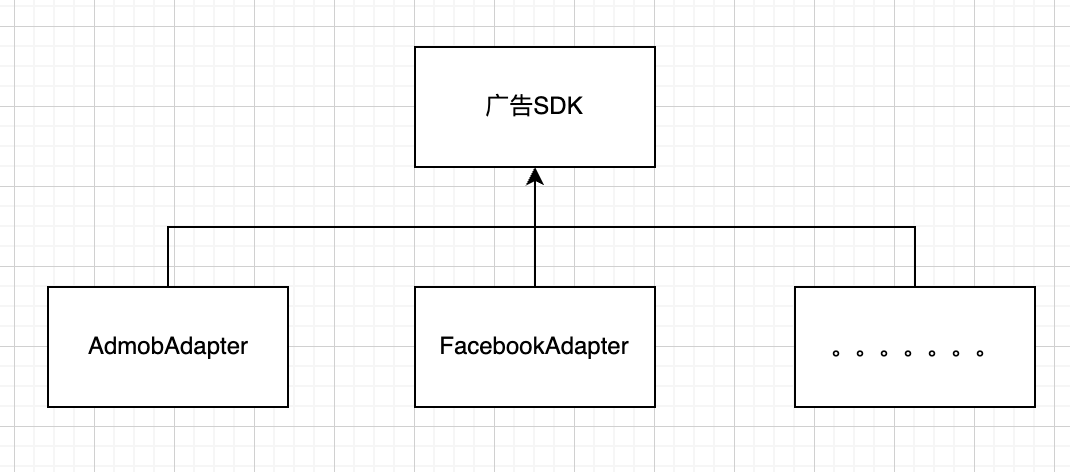
要做到可插拔效果,所以广告SDK不能对三方库的代码进行明文调用,考虑采用接口编程的方式,利用设计模式的Adapter思想,把三方的库抽离起来。广告SDK不依赖三方库SDK,通过接口维护和各个三方库的关系。

案例

创建个基础SDK,仅仅包含些接口文件,广告SDK、三方库封装的SDK均依赖于此基础SDK

BaseFramework(以插屏广告示例)

1
2
3
4
5
6
7
8
9
10
11
12
13
14
15
16
17
@protocol BaseIntersitialAdapter <NSObject>

@required
/// 通过第三方广告ID进行请求
/// @param adID 第三方ID
- (void)requestAd:(NSString *_Nonnull)adID;

/// 判断广告是否可用
- (BOOL)isAdValid;

/// 展示广告
/// @param viewController 要在此界面上展示
- (BOOL)showAdWithViewController:(UIViewController *_Nonnull)viewController;

/// 设置回调
- (void)setIntersitialDelegate:(id<BaseIntersitialDelegate> _Nullable)intersitialDelegate;
@end

封装的三方SDK Adapter(以Admob 为例)

1
2
3
4
5
6
7
8
9
10
11
12
13
14
15
16
17
18
19
20
21
22
23
24
25
26
27
28
29
30
31
32
33
34
35
36
37
38
39
40
41
42
43
44
45
46
47
48
49
50
51
52
53
54
55
56
57
58
59
60
61
62
63
64
65
66
67
68
69
70
71
72
73
74
75
76
77
@interface AdmobIntersitialAdTask ()<GADFullScreenContentDelegate>
@property (nonatomic, weak) id<BaseIntersitialDelegate> delegate;
@property (nonatomic, strong) GADInterstitialAd *interstitial;
@property (nonatomic, copy) NSString *adID;
@end

@implementation AdmobIntersitialAdTask

#pragma mark - BaseIntersitialAdapter
- (BOOL)isAdValid {
if(self.interstitial == nil) {
return NO;
}
return YES;
}

- (void)requestAd:(NSString *)adID {

self.adID = adID;

GADRequest *request = [GADRequest request];
[GADInterstitialAd loadWithAdUnitID:adID
request:request
completionHandler:^(GADInterstitialAd *ad, NSError *error) {
if (error) {
if ([self.delegate respondsToSelector:@selector(onIntersitialAdLoadFail:error:)]) {
[self.delegate onIntersitialAdLoadFail:self.adID error:error];
}
return;
}
self.interstitial = ad;
self.interstitial.fullScreenContentDelegate = self;

if ([self.delegate respondsToSelector:@selector(onIntersitialAdLoad:)]) {
[self.delegate onIntersitialAdLoad:self.adID];
}
}];
}

- (void)setIntersitialDelegate:(id<BaseIntersitialDelegate>)intersitialDelegate {
self.delegate = intersitialDelegate;
}

- (BOOL)showAdWithViewController:(UIViewController *)viewController {

if ([self isAdValid]) {
[self.interstitial presentFromRootViewController:viewController];
return YES;
}
return NO;
}

#pragma mark - GADFullScreenContentDelegate
- (void)ad:(id<GADFullScreenPresentingAd>)ad didFailToPresentFullScreenContentWithError:(NSError *)error {
if ([self.delegate respondsToSelector:@selector(onIntersitialAdDisplayFail:error:)]) {
NSError *error = [self createNewError:@"com.AdmobIntersitialAdapter" desc:@"展示失败" code:-1];
[self.delegate onIntersitialAdLoadFail:self.adID error:error];
}
}

- (void)adDidDismissFullScreenContent:(id<GADFullScreenPresentingAd>)ad {
if ([self.delegate respondsToSelector:@selector(onIntersitialAdClose:)]) {
[self.delegate onIntersitialAdClose:self.adID];
}
}

- (void)adWillPresentFullScreenContent:(id<GADFullScreenPresentingAd>)ad {
if ([self.delegate respondsToSelector:@selector(onIntersitialAdDisplay:)]) {
[self.delegate onIntersitialAdDisplay:self.adID];
}
}

- (void)adDidRecordClick:(id<GADFullScreenPresentingAd>)ad {
if ([self.delegate respondsToSelector:@selector(onIntersitialAdClick:)]) {
[self.delegate onIntersitialAdClick:self.adID];
}
}

广告SDK

1
2
3
4
5
6
7
8
9
10
11
12
13
14
15
16
17
18
19
20
21
22
23
24
25
26
27
28
29
30
31
@interface AdMobInterstitialAdTask ()<BaseIntersitialDelegate>

@property (nonatomic, strong) id<BaseIntersitialAdapter> intersitialAdTask;

@end

@implementation AdMobInterstitialAdTask

- (void)reuqestAd:(BOOL) isExpectUseAdCache {
[super reuqestAd:isExpectUseAdCache];

Class admobIntersitialAdTaskClass = NSClassFromString(@"AdmobIntersitialAdTask");
self.intersitialAdTask = [[admobIntersitialAdTaskClass alloc] init];
[self.intersitialAdTask setIntersitialDelegate:self];

dispatch_async(dispatch_get_main_queue(), ^{
[self.intersitialAdTask requestAd:self.getAdID];
});
}

- (void)showAd:(NSString *)positionID withViewController:( UIViewController *)viewController{
[super showAd:positionID withViewController:viewController];
[self.intersitialAdTask showAdWithViewController:viewController];
};

- (BOOL)isReady {
if (self.intersitialAdTask == nil) {
return false;
}
return [self.intersitialAdTask isAdValid];
}

分析

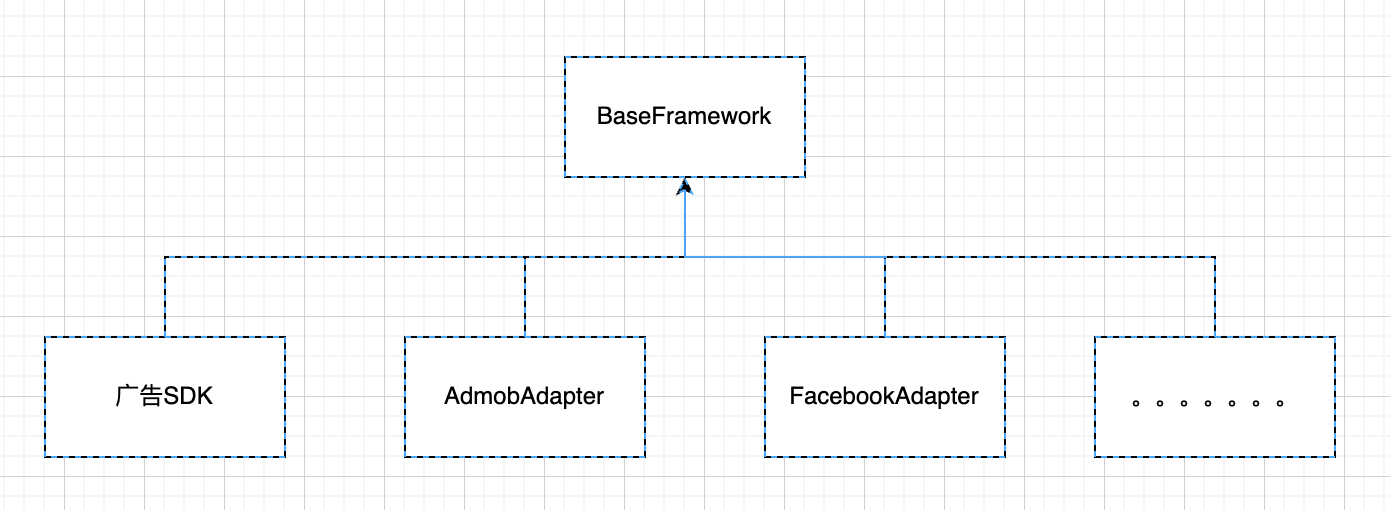
此项目的结构如下图所示:

由此,可以看出,广告SDK、和第三方渠道没有直接的关系,广告SDK、渠道方共同依赖BaseFramework,依此达到广告SDK和渠道方解耦的目的。

此方案,一个明显的问题,是需要对三方做个封装,且会对基础接口单独分装一个BaseFramework。所以如果要接10个渠道,则最终要维护的SDK数量为1+10+1 = 12个。

方案三

方案三其实是方案二的变种,方法二需要多维护一个BaseFramework。在方案三中,把BaseFramework去掉,BaseFramwork中的内容移到广告SDK中,其他渠道SDK依赖广告SDK。

此项目组的结构如下图所示:

具体代码不再示例,从项目结构中,可以明显看出,此方案较方案二可以减少一个SDK维护。

方案四

思想还是Adapter模式,方案二、三其实是通过抽象接口+Adapter的形式实现。方案四是利用了iOS语言的特性,声明一个h文件,把第三方的接口信息都复制过来,然后实际调用的时候,判断下是否实现了方法即可。

案例

AdMobInterstitialClass.h文件,仅仅只有接口的定义,把第三方的接口定义复制了过来

1
2
3
4
5
6
7
8
9
10
11
12
13
14
15
16
17
18
19
20
21
22
23
24
25
26
27
28
29
30
31
32
33
34
35
36
37
38
39
40
41
42
43
44
45
46
47
48
49
50
51
52
53
54
55
56
57
58
59
60
61
62
63
64
65
66
67
68
69
70
71
72
73
74
75
76
77
78
79
80
81
82
83
84
85
86
87
88
89
90
91
#import <UIKit/UIKit.h>
#if __has_include(<GoogleMobileAds/GoogleMobileAds.h>)
#import <GoogleMobileAds/GoogleMobileAds.h>
#else

NS_ASSUME_NONNULL_BEGIN

@protocol GADFullScreenContentDelegate;

/// Protocol for ads that present full screen content.
@protocol GADFullScreenPresentingAd <NSObject>

/// Delegate object that receives full screen content messages.
@property(nonatomic, weak, nullable) id<GADFullScreenContentDelegate> fullScreenContentDelegate;

@end

/// Delegate methods for receiving notifications about presentation and dismissal of full screen
/// content. Full screen content covers your application's content. The delegate may want to pause
/// animations or time sensitive interactions. Full screen content may be presented in the following
/// cases:
/// 1. A full screen ad is presented.
/// 2. An ad interaction opens full screen content.
@protocol GADFullScreenContentDelegate <NSObject>

@optional

/// Tells the delegate that an impression has been recorded for the ad.
- (void)adDidRecordImpression:(nonnull id<GADFullScreenPresentingAd>)ad;

/// Tells the delegate that the ad failed to present full screen content.
- (void)ad:(nonnull id<GADFullScreenPresentingAd>)ad
didFailToPresentFullScreenContentWithError:(nonnull NSError *)error;

/// Tells the delegate that the ad presented full screen content.
- (void)adDidPresentFullScreenContent:(nonnull id<GADFullScreenPresentingAd>)ad;

/// Tells the delegate that the ad dismissed full screen content.
- (void)adDidDismissFullScreenContent:(nonnull id<GADFullScreenPresentingAd>)ad;

@end

@class GADInterstitialAd;

/// A block to be executed when the ad request operation completes. On success,
/// interstitialAd is non-nil and |error| is nil. On failure, interstitialAd is nil
/// and |error| is non-nil.
typedef void (^GADInterstitialAdLoadCompletionHandler)(GADInterstitialAd *_Nullable interstitialAd,
NSError *_Nullable error);

/// An interstitial ad. This is a full-screen advertisement shown at natural transition points in
/// your application such as between game levels or news stories. See
/// https://developers.google.com/admob/ios/interstitial to get started.
@interface GADInterstitialAd : NSObject <GADFullScreenPresentingAd>

/// The ad unit ID.
@property(nonatomic, readonly, nonnull) NSString *adUnitID;

/// Information about the ad response that returned the ad.
@property(nonatomic, readonly, nonnull) GADResponseInfo *responseInfo;

/// Delegate for handling full screen content messages.
@property(nonatomic, weak, nullable) id<GADFullScreenContentDelegate> fullScreenContentDelegate;

/// Loads an interstitial ad.
///
/// @param adUnitID An ad unit ID created in the AdMob or Ad Manager UI.
/// @param request An ad request object. If nil, a default ad request object is used.
/// @param completionHandler A handler to execute when the load operation finishes or times out.
+ (void)loadWithAdUnitID:(nonnull NSString *)adUnitID
request:(nullable GADRequest *)request
completionHandler:(nonnull GADInterstitialAdLoadCompletionHandler)completionHandler;

/// Returns whether the interstitial ad can be presented from the provided root view
/// controller. Sets the error out parameter if the ad can't be presented. Must be called on the
/// main thread.
- (BOOL)canPresentFromRootViewController:(nonnull UIViewController *)rootViewController
error:(NSError *_Nullable __autoreleasing *_Nullable)error;

/// Presents the interstitial ad. Must be called on the main thread.
///
/// @param rootViewController A view controller to present the ad.
- (void)presentFromRootViewController:(nonnull UIViewController *)rootViewController;
@end

NS_ASSUME_NONNULL_END

#endif

#endif /* AdMobInterstitialClass_h */

使用的时候通过respondsToSelector判断

1
2
3
4
5
6
7
8
9
10
11
Class GADInterstitialClass = NSClassFromString(@"GADInterstitialAd");
Class GADRequestClass = NSClassFromString(@"GADRequest");
if (GADInterstitialClass && [GADInterstitialClass respondsToSelector:@selector(loadWithAdUnitID:request:completionHandler:)] && GADRequestClass && [GADRequestClass respondsToSelector:@selector(request)]) {
__weak typeof(self) weakSelf = self;
GADRequest *request = [GADRequestClass request];
[GADInterstitialClass loadWithAdUnitID:_pid
request:request
completionHandler:^(GADInterstitialAd *ad, NSError *error) {

}];
}

分析

此方式需要把第三方的接口重新复制以后,因此意味着后续升级,要特别注意接口的变更,避免三方接口变更导致这块的定义出现问题。对比Adapter方案,此方案的维护成本稍微高点。

总结

方案一:

利用runtime机制,可以实现插拔效果。但是由于需要对每个调用均反射,意味着工作量较大。后续升级成本较高等,不推荐此方案。

方案二:

Adapter模式,此方案把BaseFramework单独作为一个Framework对外,其他通过适配器模式进行开发,需要对每个渠道方做次封装,意味着维护的项目变多。但是整体成本较方案一好,且后续维护也方便。

方案三:

Adapter模式,和方案二的区别,仅仅是去掉了BaseFramework。渠道SDK依赖广告SDK即可,此方案也是个大聚合SDK常见的实现方案。

方案四:

Adapter模式,和方案二、三的区别是会把三方的接口再重新声明下,仅仅复制头文件,通过这种方式保证编译可以通过。运行时时通过动态的判断方法是否有实现等,决定是否启动渠道方。也是一些开源项目的解决方案。

参考

https://github.com/AdTiming/OpenMediation-iOS

https://github.com/googleads/googleads-mobile-ios-mediation

CATALOG
  1. 1. 目的
  2. 2. 方案一
    1. 2.1. 案例
    2. 2.2. Delegate操作
    3. 2.3. 请求广告相关
    4. 2.4. 分析
  3. 3. 方案二
    1. 3.1. 案例
    2. 3.2. 分析
  4. 4. 方案三
  5. 5. 方案四
    1. 5.1. 案例
    2. 5.2. 分析
  6. 6. 总结
  7. 7. 参考